Switching tools
Background removers compared: prices, free use and limits
We read the pricing pages, help centres and terms of five popular background removers on 27 November 2026 and put their own figures next to ours. In short: Pixelcut gives the most away for free, Photoroom and Pixelcut have the cheapest APIs, Canva and Adobe Express make sense if you already design there, and Erase.bg and ChangeBackground sell credits without a subscription. Every vendor changes its offers often, so check the linked pages before you buy.

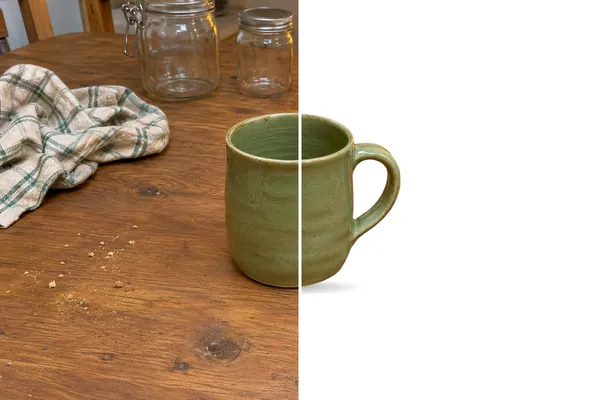
 BeforeAfter
How do the background removers compare?
The figures each vendor published on 27 November 2026, in US dollars where it showed them. We did not test the tools: limits are the ones the vendors state.
| Tool | Free | Cheapest plan | Without a subscription |
|---|---|---|---|
| Photoroom | With an account; personal use only; limited exports and removals; downloads up to 2000 × 2000 pixels | Pro: US$12.99 a month, or US$89.99 a year | No |
| Pixelcut | No sign-up and no watermark; full resolution after a free sign-in; limited number of removals | Pro: US$10 a month, or US$8 a month billed yearly | No |
| Canva | Included with paid plans; a limited number of free high-resolution downloads to try it | Part of Canva’s paid plans | No |
| Adobe Express | With an account; Adobe’s pages disagree on whether it is free | Premium: US$9.99 a month | No |
| Erase.bg | Personal use only; its pages disagree on how many free high-resolution downloads you get | Credit packs | Credit packs from $5 for 10 credits |
| ChangeBackground | No account; preview up to 600 pixels | No subscription | US$1.99 for one photo, down to US$0.18 per photo in packs |
| Tool | Largest download | Many photos at once | API |
|---|---|---|---|
| Photoroom | 4096 × 4096 pixels on paid plans (web) | Batch on all plans; exporting needs a paid plan | US$0.02 per image |
| Pixelcut | The photo’s own size; uploads up to 6000 × 6000 pixels and 50 MB | Up to 10,000 per batch with Pro | About US$0.05 per image |
| Canva | Up to 10 megapixels; photos under 9 MB | Up to 50 images at a time | Through Leonardo.ai, US$0.1047 per image |
| Adobe Express | Not stated; uploads up to 40 MB and 4k × 4k | No | Enterprise contracts only |
| Erase.bg | 10,000 × 10,000 pixels, 25 MB | With paid credits | Through Pixelbin |
| ChangeBackground | The photo’s own size, up to 1024 pixels on the longest side | Up to 50 photos with a free account | No |
Photoroom
Photoroom is a photo editor for online sellers, on the web and in apps for iPhone and Android, with AI backgrounds, shadows and templates.
- Free: you need an account, and the free plan is for personal, non-commercial use only. Exports are limited (its help centre lists 25 a week or 100 a month), background removal has a daily limit with no number given, and web downloads are at most 2000 × 2000 pixels.
- Paid: Pro costs US$12.99 a month or US$89.99 a year, with 1,000 exports a month. Max costs US$34.99 a month or US$249.99 a year, Ultra US$99 a month or US$990 a year.
- Limits: paid web downloads go up to 4096 × 4096 pixels, 2048 × 2048 in batch mode. The web app does not open HEIC photos; the phone apps do.
- API: the Remove Background API costs US$0.02 per image, with 10 free calls. App plans include no API use.
Pixelcut
Pixelcut is a web and phone photo editor with a background remover, AI backgrounds, an upscaler and a bulk editor.
- Free: no sign-up and no watermark. Pixelcut says you get the full resolution after a free sign-in. The number of free removals is “limited”, with no figure.
- Paid: Pro costs US$10 a month, or US$8 a month billed yearly, with unlimited background removal and 1,000 batch exports a month. Business costs US$30 a month, or US$24 a month billed yearly.
- Limits: JPG, PNG and HEIC uploads up to 50 MB and 6000 × 6000 pixels, kept at their own size. Batches of up to 10,000 images with Pro.
- API: 5 credits per background removal at US$0.01 a credit, about US$0.05 per image, with plans from US$10 a month and 100 free credits.
Canva
Canva is a design platform; its Background Remover works inside a Canva design. From 1 December 2026 it also replaces the remove.bg website, and remove.bg says it uses the same technology. See what changes for remove.bg users.
- Free: Canva’s help centre says the background remover is included with paid plans; its feature page offers a limited number of free high-resolution downloads to try it.
- Paid: part of Canva’s paid plans, such as Canva Pro. Canva’s pricing page did not load when we checked on 27 November, so check the current price there.
- Limits: photos under 9 MB; larger results are reduced to 10 megapixels. Up to 50 images at a time.
- API: through Leonardo.ai, also part of Canva, at US$0.1047 per image.
Adobe Express
Adobe Express is Adobe’s design app for social posts, flyers and videos. Its Remove Background quick action works on one photo at a time.
- Free: you need an Adobe account. The plan comparison for individuals lists Remove Image Background in the free plan, while Adobe’s business FAQ calls it a premium feature. The eraser for touching up a cut-out is premium.
- Paid: Premium costs US$9.99 a month, billed monthly; Adobe showed no yearly price.
- Limits: the quick action takes JPG and PNG photos up to 40 MB and 4k × 4k, not HEIC. The size of the download is not stated.
- Good to know: Adobe’s Express remove-background page now sends visitors to Adobe Firefly, which has its own free daily limit. Batches and the API are for enterprise customers.
Erase.bg
Erase.bg is a background remover from Pixelbin, on the web and in apps, with plugins for Figma and Photoshop.
- Free: for personal use only. Its pages describe the free use in three different ways: free high-resolution downloads, 3 free credits when you sign up, or 3 credits a day.
- Paid: credit packs that stay valid for a year, “starting at $5 for 10 credits” according to its FAQ. Its price list was shown to us only in Singapore dollars: 5.92 for 10 credits, 11.84 for 100 and 23.68 for 1,000.
- Limits: photos up to 25 MB and 10,000 × 10,000 pixels, HEIC included.
- Batches and API: batch mode with paid credits, and an API through Pixelbin at 1 credit per image.
ChangeBackground (this site)
ChangeBackground removes and changes backgrounds in the browser, with free previews and pay-per-photo downloads. We make it, so weigh this section accordingly.
- Free: no account needed. Remove or change the background, add a shadow, blur the background, and download a preview up to 600 pixels. Up to 50 photos at once with a free account.
- Paid: no subscription. A full-resolution download costs 1 credit: US$1.99 for one photo, or packs from US$9 for 10 to US$1,800 for 10,000 (US$0.18 per photo). Credits stay valid for 2 years. See Pricing.
- Limits: JPG, PNG and HEIC photos up to 30 MB. Photos are reduced to 1024 pixels on the longest side when you upload them, so that is the largest download for now.
- Missing: there is no public API and no phone app; it works in the browser on phones, tablets and computers.
Which background remover should you choose?
- A few photos now and then: pay per photo instead of a subscription, with ChangeBackground or Erase.bg, or use Pixelcut’s free tier if its limits are enough.
- Large photos for print: Erase.bg, Pixelcut and Photoroom’s paid plans give larger downloads than ChangeBackground does today.
- Hundreds of product photos a month: a subscription with batches, such as Pixelcut Pro or Photoroom Pro, usually costs less per photo.
- An app or a website that removes backgrounds: an API from Photoroom, Pixelcut or Leonardo.ai.
- You already design in Canva or Adobe Express: use the background remover that comes with your plan.
How to test a background remover before you pay
Use your hardest photo
Pick a photo with loose hair, fur, glass or a white product on a white table. Easy photos look good in every tool.
Check the edges at full size
Zoom in to 100% on hair and thin parts, and look at the cut-out on a dark and on a light background.
Check the size of the download
Open the downloaded file and look at its width and height. Free downloads are often smaller than the photo you uploaded.
Read the terms for commercial use
Some free plans are for personal use only. For product photos and ads, make sure the plan you use allows commercial use.
Work out the price per photo
Divide the price by the number of photos you really edit in a month. A subscription you barely use costs more per photo than credits.
Frequently asked questions
Which background remover is free without an account?
Pixelcut and ChangeBackground let you remove a background and download the result without signing up. Pixelcut gives the full resolution after a free sign-in; ChangeBackground’s free download is a preview up to 600 pixels.
Which background remover is the cheapest?
It depends on how many photos you edit. For a few photos a month, paying per photo costs less than a subscription; for hundreds, Pixelcut Pro at US$8 a month billed yearly or Photoroom Pro at US$89.99 a year cost less per photo.
Is Canva’s Background Remover free?
Canva says the background remover is included with its paid plans, and offers a limited number of free high-resolution downloads to try it.
Is Adobe Express’s background remover free?
Adobe’s plan comparison for individuals lists Remove Image Background in the free plan, while its business FAQ calls it a premium feature. You need an Adobe account either way.
Which background remover has an API?
Photoroom (US$0.02 per image), Pixelcut (about US$0.05 per image), Leonardo.ai for Canva and remove.bg users (US$0.1047 per image) and Erase.bg through Pixelbin. Adobe’s API is for enterprise customers. ChangeBackground has no public API.
Why is there no US dollar price for Erase.bg?
Erase.bg showed its price list to us only in Singapore dollars. Its FAQ says the packs start at $5 for 10 credits.
How old are these prices?
We read them on the vendors’ own pages on 27 November 2026, and Canva’s on 25 November 2026. Prices change often and can differ by country, so check the linked pages before you buy.
Sources
- Photoroom: Pricing photoroom.com
- Photoroom: Export limit help.photoroom.com
- Photoroom: Image resolution limits for exports help.photoroom.com
- Photoroom: Free accounts and commercial use help.photoroom.com
- Photoroom: Supported file formats help.photoroom.com
- Photoroom: API pricing photoroom.com
- Pixelcut: Background remover pixelcut.ai
- Pixelcut: Pricing pixelcut.ai
- Pixelcut: Bulk image editor pixelcut.ai
- Pixelcut: API pixelcut.ai
- Canva Help Center: Background remover canva.com
- Canva: Background remover canva.com
- remove.bg: remove.bg is moving to Canva (FAQ) remove.bg
- Leonardo.ai: Migrate from the remove.bg API docs.leonardo.ai
- Adobe Express: Pricing adobe.com
- Adobe Express: Photo quick action file requirements helpx.adobe.com
- Adobe Firefly: Remove background adobe.com
- Erase.bg erase.bg
- Erase.bg: Pricing erase.bg
ChangeBackground wrote this comparison and makes one of the tools compared. It is not affiliated with Photoroom, Pixelcut, Canva, Adobe or Erase.bg. Their facts and prices come from their own pages, read on 27 November 2026 (Canva’s on 25 November 2026) from outside the United States; the prices you see can differ by country and include local taxes.