Logos and signatures
How to make a transparent PNG of your signature
To make a transparent signature, sign with a black felt-tip or gel pen on plain white paper, photograph it from straight above in daylight, and remove the paper with Remove Background, keeping Smooth edges. Download it as a PNG: unlike a JPG, a PNG keeps the transparency, so the signature sits on a signature line or coloured paper without a white box. Thin ballpoint strokes can come out faint, so use a bolder pen. A pasted signature image is fine for everyday letters and forms, but wills, deeds and some official forms need a handwritten or certified signature.
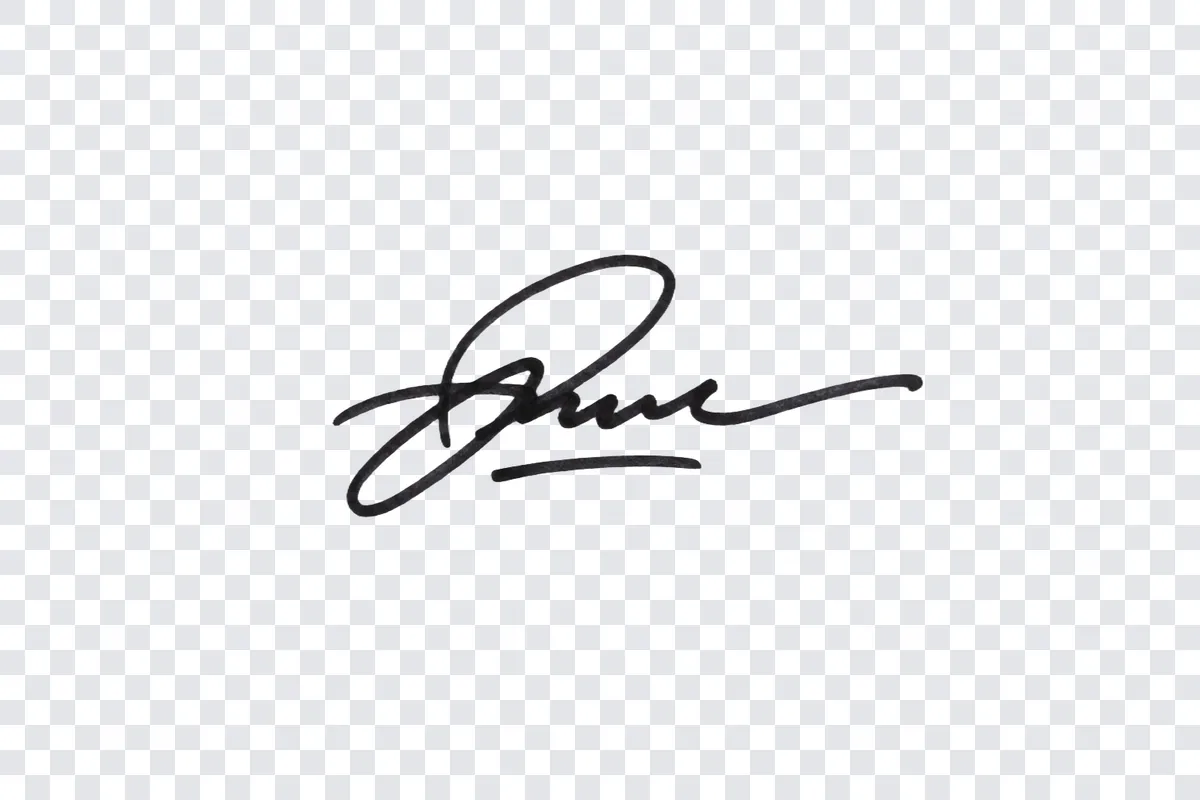
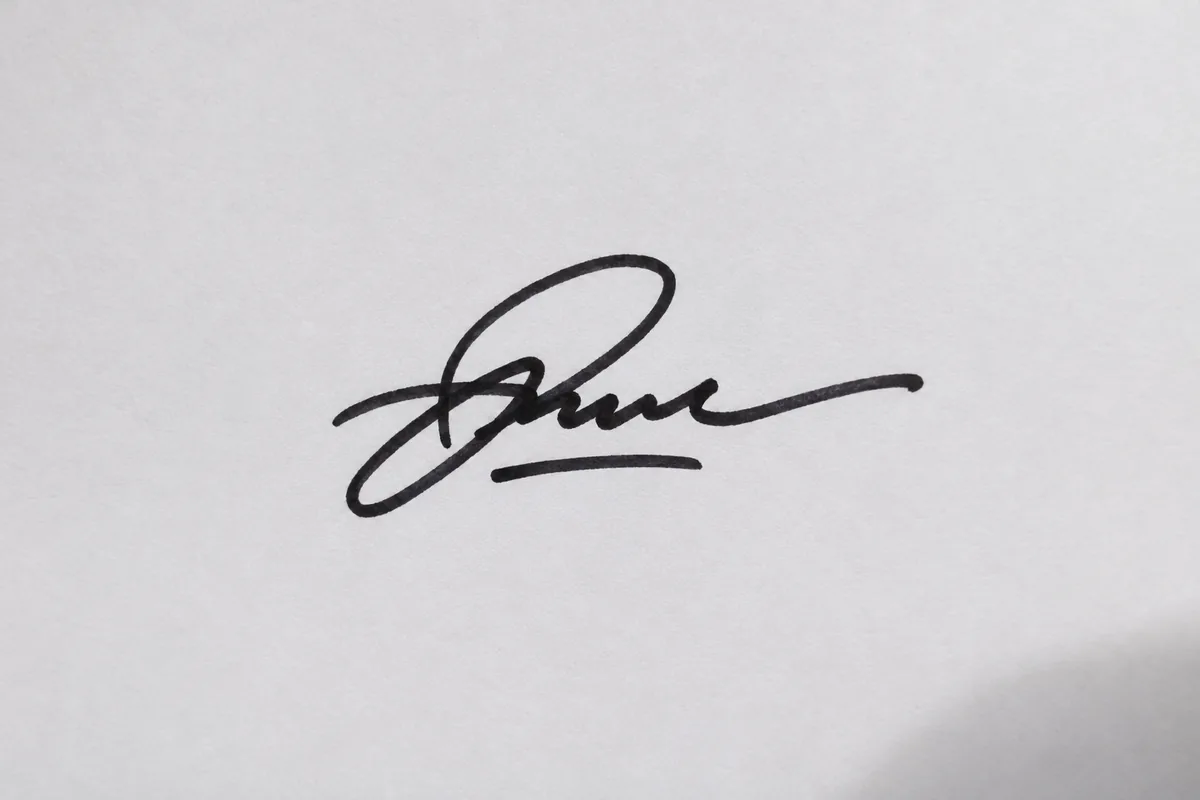 BeforeAfter
How do you make a transparent signature PNG?
You need a pen, a sheet of white paper and a phone. It takes about two minutes:
Sign on white paper
Sign with a black felt-tip or gel pen on plain, unlined white paper, a little larger than usual.
Photograph it
Lay the paper flat by a window and take the photo from straight above, with no shadow from the phone or your hand across the signature. A scan at 300 dpi works too.
Upload the photo
Open Remove Background and upload the photo, or drop it on the page. The paper is removed in a few seconds.
Keep Smooth edges
Smooth edges, the default, keeps every stroke. Hair & fur is for pets and loose hair and can erase thin lines.
Check it on a colour
Pick a colour in the Color tab to see every stroke clearly, then choose Transparent again.
Download the PNG
Download the free preview, or the full-size transparent PNG with Full resolution for 1 credit.
Crop the photo close to the signature before you upload it. The signature then fills the picture and comes out larger.
Which pen and paper work best?
Signature services ask for the same things. Dropbox Sign, for example, asks for black ink, “as bright a white background as possible”, and scans of at least 300 dpi cropped to the signature. We photographed two signatures on the same paper and removed the background from both:

Wrong:A thin blue ballpoint: the strokes came out faint and broken.

Right:A black felt-tip: every stroke kept, solid and even.
- Black ink is the safest choice. Some signature services accept only black, and dark ink stands out most from the paper.
- A bold pen: a felt-tip, gel or fineliner pen gives solid lines. With a ballpoint, press firmly.
- Plain paper: lines or squares from a notebook can end up in the cut-out.
- Even light: a shadow across the paper turns it grey, and faint strokes in the shadow are the first to go.
- Phone parallel to the paper, so the signature isn’t slanted or stretched.
How do you add your signature to Word, Google Docs or an email?
Every common document and email program can place a PNG picture. Because the background is transparent, the signature can sit over a signature line without hiding it:
| Where | How |
|---|---|
| Word (Windows and Mac) | Insert > Pictures, then choose the PNG and drag a corner to resize it. To reuse it with your typed name and title, select them together and save them as AutoText. |
| Google Docs | Insert > Image > Upload from computer. Click the picture and choose In front of text to place it over a line. |
| Pages and Preview (Mac) | Both have their own Remove Background button. Preview’s Sign tool records a signature with the trackpad, the camera or an iPhone, not from a picture file. |
| Gmail | Settings > See all settings > Signature: add the picture, then Save Changes. Gmail recommends 70 to 100 pixels high and 300 to 400 wide, at most 100 × 1000. |
| Outlook (classic, Windows) | In a new message, Signature > Signatures, then the Image button to insert the picture. |

Wrong:The photo as it is: the grey paper covers the line.

Right:The transparent PNG: only the ink, the line shows through.
Word has its own Set Transparent Color tool, but Microsoft says it makes only one colour transparent and “works best with simple, solid-color pictures, such as clip art”. Photographed paper is never one exact colour, so grey patches stay behind; a background remover deals with shades and shadows.
What size should a signature picture be?
- Documents you print: about 300 pixels for every inch of printed width. A signature printed 2 inches (5 cm) wide needs about 600 pixels across.
- Email: Gmail recommends 70 to 100 pixels high and 300 to 400 pixels wide, and allows at most 100 × 1000. Make a smaller copy for email.
- Signature services: follow their own instructions. Some ask for 300 dpi, others for a small file.
Is a pasted signature picture legally valid?
For everyday paperwork, usually yes, as long as you meant to sign. A picture of your handwritten signature counts as an electronic signature, the simplest kind. But the other side doesn’t have to accept it, and some documents need more. This is general information, not legal advice: check the rules for your document, or ask a lawyer.
| Where | What the rules say |
|---|---|
| United States | Under the federal ESIGN Act, a signature on a contract or other record of a transaction can’t be refused legal effect just because it is electronic. The Act doesn’t cover wills, adoption, divorce and other family matters, or court documents, and nobody has to accept electronic signatures. |
| European Union | Under the eIDAS regulation, an electronic signature can’t be refused as evidence just because it is electronic. Only a qualified electronic signature, made with a qualified certificate and a special signing device, has the same effect as a handwritten one in every EU country. |
| England and Wales | The Law Commission (2019) says an electronic signature, including a scanned handwritten one, can sign a document if you mean to authenticate it and any formalities are met. A deed needs a witness who is physically present, and a will must be signed in front of 2 witnesses. |
| Government forms | Agencies set their own rules. USCIS, the US immigration agency, doesn’t accept a picture of a handwritten signature pasted onto a form, but does accept a scan or copy of a form signed by hand. |
Don’t paste a signature picture onto a will, a deed, a court filing or an official form that asks for a handwritten signature. Sign those in ink, or use the signing method the form names.
Is it safe to share your signature picture?
Treat it like a key. The Law Commission for England and Wales puts it plainly: “anyone with access to a scanned manuscript signature may affix it to any document.” Some sensible precautions:
- Keep the PNG in a private folder. Don’t post it online or put it in a CV, a public profile or a shared link.
- Send signed documents as PDFs rather than editable files: in Word, anyone can right-click a picture and save it.
- Use your typed name in email signatures rather than your handwritten signature.
- For contracts, money and property, use an e-signature service that records who signed and when, or a certificate-based digital signature.
Photos uploaded to ChangeBackground are deleted automatically within 1 hour.
Frequently asked questions
How do I make my signature transparent for free?
Sign on white paper, take a photo, remove the paper with Remove Background and download the free preview PNG. The full-size PNG costs 1 credit.
Why is my signature faint or broken after removing the background?
Thin, light strokes are hard to tell apart from the paper, especially in a shadow. Sign again with a black felt-tip or gel pen and photograph it in even light.
Can I use a JPG of my signature?
A JPG can’t be transparent, so the paper comes along as a white or grey box. It covers signature lines and shows on coloured paper. Use a PNG.
What size should my signature PNG be?
About 600 pixels across for a signature printed 2 inches (5 cm) wide. For Gmail, 70 to 100 pixels high and 300 to 400 wide.
Is a scanned signature legally binding?
For everyday documents it usually counts as an electronic signature if you meant to sign, in the US, the EU and England and Wales. The recipient can still refuse it, and wills, deeds, court documents and some official forms need more.
Should I sign in blue or black ink?
Black is the safest for a signature picture: it stands out most from the paper, and some signature services accept only black. Forms that need ink say which colour.
Do you keep my signature?
No. Uploaded photos are deleted automatically within 1 hour. Keep the PNG you download in a private place.
Sources
- Microsoft Support: Insert a signature support.microsoft.com
- Microsoft Support: Make a picture transparent in Word support.microsoft.com
- Google Docs Help: Insert images support.google.com
- Apple Support: Remove a background in Preview on Mac support.apple.com
- Apple Support: Fill out and sign PDF forms in Preview on Mac support.apple.com
- Apple Support: Remove the background in Pages on Mac support.apple.com
- Gmail Help: Create a Gmail signature support.google.com
- Gmail Help: Troubleshoot issues with Gmail signatures support.google.com
- Microsoft Support: Create and add an email signature in Outlook support.microsoft.com
- Dropbox Help: Why won’t my signature upload to Dropbox Sign? help.dropbox.com
- University of Colorado Boulder Print Lab: Image resolution and print size (PDF) colorado.edu
- Cornell LII: 15 U.S. Code § 7001, general rule of validity law.cornell.edu
- Cornell LII: 15 U.S. Code § 7003, specific exceptions law.cornell.edu
- European Commission: eSignature FAQ ec.europa.eu
- Law Commission: Electronic execution of documents (Law Com No 386, PDF) cdn.websitebuilder.service.justice.gov.uk
- Law Commission: Electronic execution of documents, summary (PDF) cdn.websitebuilder.service.justice.gov.uk
- GOV.UK: Make sure your will is legal gov.uk
- USCIS Policy Manual: Signatures uscis.gov
The two signatures are made-up scribbles in AI-generated photos, not anyone’s real signature. Their backgrounds were removed with ChangeBackground’s own background remover, exactly as described above. The rules are quoted from official pages, checked on 25 November 2026. This guide is general information, not legal advice.